

How To Add A Raptor Steering Wheel To Your Non-Raptor F-150
The Ford F-150 is a great truck with a comfortable interior. Yet, sometimes it's nice to upgrade a few things. The Raptor steering wheel is a great example. For starters, Raptor steering wheels:
- Look great
- Are heated
- Are easier to grip
- Are made with better quality materials
If you're interested in upgrading to a Raptor steering wheel, this tutorial will help you do that. Basic hand tools and little mechanical knowledge are all that is required. If you're looking for a place to start tinkering on your truck, adding a new steering wheel would be an excellent choice. You'll need the following tools:
Parts List
The stock parts in your F-150's steering system may not be compatible with your new Raptor wheel. It all depends on how old your truck is, and how old the Raptor steering wheel is. To make your Raptor steering wheel work with your F-150, you'll need to replace some parts.
It's a good idea to stock up on these parts before starting the steering wheel swap:
- Raptor steering wheel
- Not all Raptor steering wheels are heated. If you want a heated one, get a Raptor steering wheel built for a higher trim level.
- Clock spring
- Harnesses
- Control buttons
- Torque sensor
- An airbag (only if your F-150 steering wheel doesn't have an airbag that works)
- A module for the steering wheel heater (if your stock steering wheel isn't heated)
- Paddle shifters
- Keep in mind that adding paddle shifters isn't an easy job. You would need to take care of a lot of wiring. The steps aren't included in this tutorial. You would need to find a different tutorial for this.
If you need help finding the right parts for your F-150, you're more than welcome to contact us. We're always happy to help!
Here's an overview of how to swap a Raptor steering wheel into your F-150:
1. Remove The Old Steering Wheel
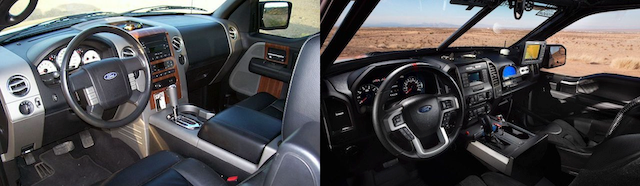
The first step of this tutorial is removing the old steering wheel. First, you need to get your truck ready. That means taking the following steps:
- Keep the steering wheel straight.
- Disconnect the battery. This ensures that the airbag won't deploy, so you cannot skip this step.
- Remove the airbag.
- With an Allen wrench, apply pressure in the small holes on both sides of the stock steering wheel. There's another hole underneath the steering wheel. The air bag will pop out a bit. There's an airbag panel on the steering wheel. Apply pressure behind it with the Allen wrench. When the airbag is out, disconnect all three connectors behind it. Set it down face up in case it deploys.
With the airbag out, you can remove the stock F-150 steering wheel. You would need the following tools:
- A Phillips head screwdriver
- Needle nose pliers
- A wrench
- A paint marker
- A steering wheel puller
Behind the steering wheel spokes, there are two screws. Remove these screws with the Phillips head screwdriver.
Next, lift the top of the steering wheel. Doing this will expose the horn assembly and cruise control wires, if your steering wheel comes with these features. Use the needle nose pliers to pinch the J-clip for the cruise control ground wire. Be sure not to pull the ground wire without compressing the clip, or it'll break.
If the steering wheel assembly comes with horn switch wiring, remove it and then pull out the assembly. Now, you can see the steering wheel nut. Remove it with the wrench. You may need to apply some torque to get that done. With the paint marker, mark the shaft and steering wheel. This will help you install the Raptor steering wheel in the same position.
Use the wheel puller to remove the steering wheel. Be careful not to damage the steering shaft.
2. Install The Raptor Steering Wheel
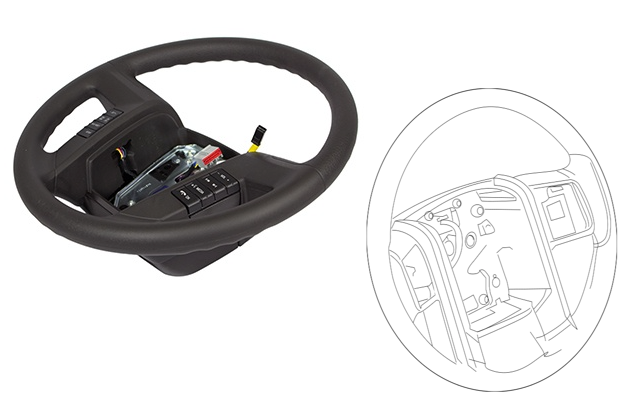
If you have a new clock spring, install it first. Put the new Raptor steering wheel into place in the reverse order of the stock steering wheel removal process. It's during this step that you can install new upgrades, such as:
- Paddle shifters
- Steering wheel heater module
Each upgrade requires a separate tutorial. It's important to find good quality tutorials that are specific to your truck.
With the Raptor steering wheel in place, it's time to remove the plate above the controls. Next, swap in some new components or components from the stock F-150 wheel:
- Factory control buttons
- Harnesses
- Torque sensor
Finally, it's time to put everything back together. To be more specific:
- Route the wires
- Reconnect the controls
- Reinstall the plate above the controls
- Install the airbag into the new steering wheel
- Reconnect the battery
Take your truck out for a test drive to see if the new steering wheel works as it should. Be sure to drive in a low-speed area with no cars around.